
New features: Pinned notes on contacts and more
Date: 30 April 2026
We’re excited to introduce a range of new features and enhancements designed to make managing your contacts and inventory in Stantia even more efficient.
Date: 30 April 2026
We’re excited to introduce a range of new features and enhancements designed to make managing your contacts and inventory in Stantia even more efficient.
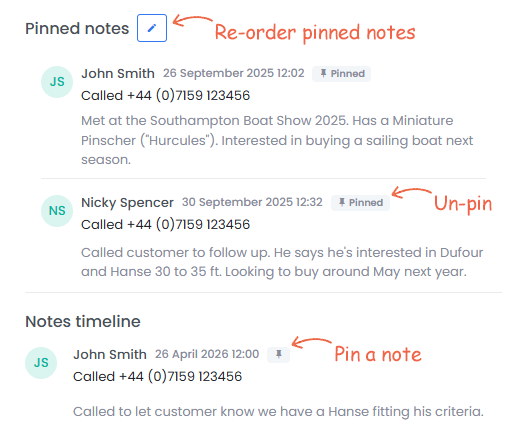
Stantia’s contact notes already help you keep track of every interaction with your customers, but when there’s a long history, important details can be easy to miss.
With our new pinned notes feature, you can highlight key information by pinning notes to the top of the timeline. Simply click the pin icon on any note to keep it front and centre. You can pin multiple notes, ensuring your most important insights are always visible.
You can also reorder pinned notes by clicking the edit icon and using drag-and-drop to arrange them however you like.
This feature is ideal for capturing key context, such as where you first met a contact, who introduced you, or any personal details that help you build stronger relationships.
We’re also working on bringing a similar notes capability to the boat inventory section.
We’ve expanded the boat inventory search to give you even greater control and precision.
You can now filter listings by:
Beam
Keel type
Charter price
Country subdivision (e.g. state or province, for supported countries)
In addition, the keyword search has been enhanced. You can now search by both the boat’s Stantia ID and TheYachtMarket ID, making it quicker to locate specific listings.
Following customer feedback, keel type is now included in the boat interests matching system.
Boat interests are a powerful way to manage buyer requirements. Simply navigate to the Interests tab on a contact to enter their search criteria. Stantia will instantly display matching boats from your inventory and notify you when new listings meet their needs.
Find out more about Stantia’s boat interests matching feature.
We’ve fixed an issue where some images were being cropped incorrectly on window card PDFs.
Stantia’s PDF creator allows you to generate branded brochures and window cards for your listings in just a few clicks. With everything in one place, there’s no need to duplicate effort across multiple systems, saving you time while maintaining a professional presentation.
Read more about our boat PDF creator here.
We have many more improvements in development. To stay up to date with the latest features, be sure to sign up for the Stantia newsletter.